
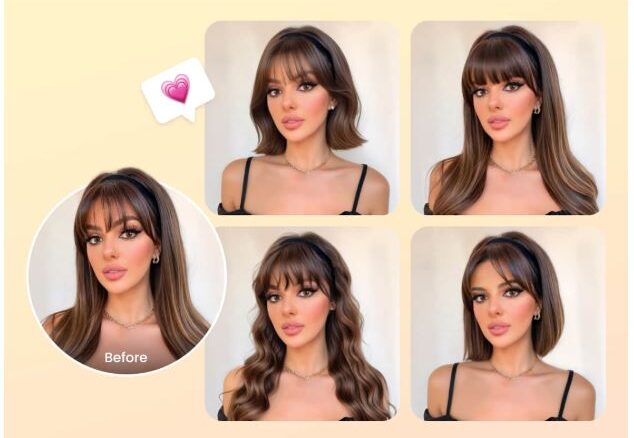

Experimenting with a new hairstyle has always been a mix of excitement and uncertainty. Will that cut really frame your face? Is the color too bold? Thanks to modern technology, these questions can be answered before ever picking up scissors. Today, AI hairstyle tools allow anyone to experiment virtually, making hair makeovers safer, faster, and more creative. Whether you’re a busy professional or a style enthusiast, AI now lets you preview a new look without the risk.
How to Change Your Hairstyle with BeautyPlus
BeautyPlus has evolved beyond a simple photo editor into a powerful tool for virtual hairstyling. Its intuitive interface makes it easy for users of any skill level to try new looks. One standout feature is the bangs filter, which allows you to see how different fringe styles suit your face.
Here’s a simple step-by-step guide to using BeautyPlus for hairstyling:
- Open BeautyPlus Website and find AI hairstyle.
- Upload a selfie – Use a clear, well-lit front-facing photo for the best results.
- Select the hairstyle filter – Explore options like bobs, waves, or long layers.
- Generate the look – AI will generate the hairstyle automatically to match your preferences.
- Save or share – Compare multiple looks and show them to your stylist or friends before making a decision.
With BeautyPlus, the combination of AI-powered adjustment and real-time previews makes the experience fun and low-pressure. It’s perfect for casual experimentation or minor makeovers.
How to Change Your Hairstyle with Gemini Nano Banana
Gemini Nano Banana takes virtual hairstyling to the next level with generative AI. Unlike traditional photo editors, it understands facial structure, hair texture, and lighting, producing results that often look indistinguishable from real photographs.
Here’s how to use Nano Banana effectively:
- Access the platform – Use the web interface or supported app.
- Upload your photo – Make sure your face is clearly visible and well-lit.
- Enter a text prompt – Example: “Shoulder-length wavy bob with caramel highlights.”
- Generate variations – The AI creates multiple realistic options based on your input.
- Fine-tune details – Adjust hair length, style, or color iteratively until satisfied.
- Download or export – Save the final image for inspiration, social media, or professional use.
Nano Banana is particularly useful for anyone looking for a highly accurate preview or multiple iterations of a major change. Its flexibility makes it appealing to stylists, photographers, and fashion professionals.
BeautyPlus vs. Nano Banana
Both platforms are powerful, but they cater to different needs. BeautyPlus is ideal for casual users: quick, fun, and easy to share. Its filters, including the bangs filter, offer instant results and social-friendly previews.
Nano Banana, on the other hand, appeals to users seeking more styles. It allows for precise adjustments and multiple iterations, making it ideal for those planning major hair transformations or using the images for creative projects.
In short, if you want fun and fast experimentation, BeautyPlus is the way to go. If you want polished, realistic previews with detailed customization, Gemini Nano Banana delivers unmatched results.
Summary
AI tools have removed the uncertainty from trying new hairstyles, allowing users to experiment confidently before committing to a change. Platforms like BeautyPlus and Gemini Nano Banana combine creativity, convenience, and realism, serving both casual users and professionals.
With AI hairstyle tools, anyone can explore bold ideas, test trends, or simply have fun with their look—all from the comfort of their home. As technology continues to advance, virtual hairstyling is no longer a novelty; it’s an essential tool for making informed, stylish decisions. The next time you’re considering a haircut, color change, or fringe, these AI tools ensure your choice is backed by visualization, precision, and creativity.