

The way creators, designers, and marketers produce visual content has been permanently transformed by artificial intelligence. Whether you’re building a brand campaign, producing social media assets, or simply experimenting with generative art, having the right tools matters more than ever. At the center of this revolution is the concept of an AI Creative Canvas — a unified, visual workspace where ideas become stunning images and videos through the power of AI models, node-based workflows, and infinite creative freedom.
This article explores what an AI creative canvas is, why it matters, and how platforms like Banana Pro AI Studio are setting a new standard for creators worldwide.
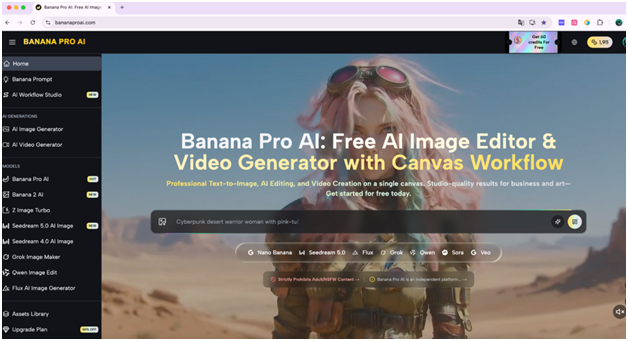
What Is an AI Creative Canvas?
An AI creative canvas is a digital workspace that combines visual design tools with AI generation capabilities, allowing users to produce, connect, and iterate on creative assets — all in one place. Unlike traditional design tools that rely on manual illustration or photo editing, an AI creative canvas leverages machine learning models to generate images or videos directly from text prompts or reference files.
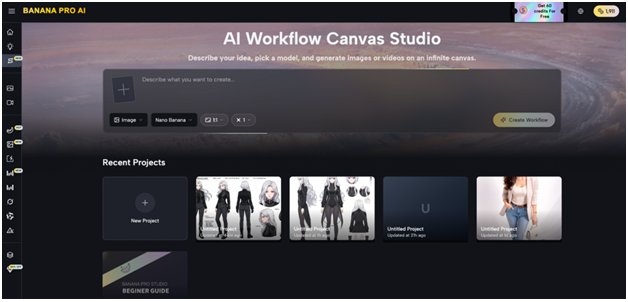
The key differentiator from basic AI generators is the visual, node-based workflow. Users can place “nodes” representing text prompts, image outputs, video outputs, or uploaded assets — and then connect them in a pipeline. The result is a transparent, controllable creative process that mirrors how professional workflows actually operate.
Why Node-Based Workflows Are a Game-Changer
Traditional AI tools give you a text box and a generate button. An AI creative canvas goes far beyond that:
- Text → Image → Video pipelines: Write a prompt, generate an image, then use that image as the starting frame for a video — all within the same canvas.
- Visual overview: See your entire creative project at a glance on an infinite, zoomable canvas.
- Iterative creativity: Regenerate, branch, and explore multiple directions simultaneously without losing your work.
- No-code complexity: Build multi-step workflows using only drag-and-drop connections — no programming required.
This approach makes sophisticated AI workflows accessible to beginners while still offering the depth and flexibility that professionals demand.
Banana Pro AI Studio: A Leading AI Creative Canvas
Banana Pro AI Studio is one of the most feature-complete free AI creative canvases available today. Built around an infinite, visual node-based workspace, it integrates image generation, video generation, and project management into a single platform.
Supported AI Models
The platform provides access to over 9 cutting-edge AI models across two categories:
Image Generation:
| Model | Best For |
| Nano Banana Pro | High-quality generation with reference image support |
| GPT-4o Image | OpenAI-powered creative generation |
| Flux Kontext Pro / Max | Advanced style transfer and editing |
| Z-Image Turbo | Ultra-fast text-to-image |
| Grok Imagine | Creative generation with reference support |
| Seedream | High-fidelity artistic output |
| Qwen Image Edit | Precise image transformations |
Video Generation:
| Model | Best For |
| Veo 3.1 Premium | Top-tier quality with image-to-video |
| Veo 3.1 Basic | High-quality video at lower credit cost |
| Veo 3 Premium / Basic | Advanced and accessible video creation |
Key Features of an AI Creative Canvas Workflow
- Infinite Canvas with Real-Time Auto-Save
Banana Pro AI Studio’s canvas is zoomable and pannable — giving users space to spread out complex projects without running out of room. Every change is auto-saved using a dual-layer system: instant local saves in your browser, plus cloud sync for cross-device access and protection against data loss.
- Batch Generation for Rapid Exploration
Instead of generating one image at a time and hoping for the best, users can create up to 4 variations per node in a single click. Each variation uses the same prompt but produces unique results, letting creators compare directions side-by-side before committing to one.
- Smart Node Connections
Every node on the canvas has input and output handles. Dragging a line between two nodes creates a dependency — for example:
- A text node feeding its prompt into an Image node
- An Image node passing its output as a reference frame into a Video node
- An Upload node piping a real photo into an AI editing model
The system validates connections automatically, so users can’t accidentally wire up incompatible nodes.
- History Panel and Version Tracking
Every image and video ever generated within a project is tracked in the History panel. Users can browse, revisit, and restore previous generations — a critical feature for professional projects where a rejected output might become the right choice later.
Getting Started: The 5-Step Workflow
For those new to the platform, the Banana Pro AI Studio breaks down the entire process into five clear steps:
- Create a New Project — Open the Studio dashboard, create a project, and your infinite canvas is ready.
- Add Nodes — Click or drag Image, Video, Text, or Upload nodes from the sidebar onto the canvas.
- Connect Nodes — Build your pipeline by dragging connections between node handles.
- Generate & Iterate — Hit Generate on any node, preview the result, and refine with tweaks or model swaps.
- Export & Manage — Download high-resolution, watermark-free outputs and manage all your projects from one dashboard.
Who Should Use an AI Creative Canvas?
An AI creative canvas is the right tool for a broad range of users:
- Social media managers — Produce consistent branded visuals and short-form videos quickly.
- Graphic designers — Use AI models to accelerate concept exploration and style iterations.
- Content marketers — Generate campaign imagery, ad creatives, and video clips without a production team.
- Freelancers and agencies — Scale visual content delivery for multiple clients from a single workspace.
- Hobbyists and learners — explore AI-generated art with no coding knowledge or prior experience.
Since all outputs on Banana Pro AI Studio are watermark-free and commercially licensed, creators can use their work freely across marketing, e-commerce, client deliverables, and beyond.
Final Thoughts
The shift from static design tools to dynamic, AI-powered creative canvases represents one of the biggest leaps in digital content creation history. An AI creative canvas doesn’t just make image generation faster — it fundamentally changes how creative projects are structured, iterated, and delivered. With visual pipelines, multi-model access, and intelligent auto-save, platforms like Banana Pro AI Studio give every creator — beginner or professional — the infrastructure to produce world-class content at a fraction of traditional cost and time. Sign up free and start building your AI creative workflow today.