

A shop owner answering order questions on a phone at the counter is fine until the day there are forty of them. The messages pile up between card payments, someone asks for the address again, someone else wants to know if you close at six, and half the replies get typed with one thumb while the other hand is doing something else.
Small teams hit this wall fast. Customers now expect a reply on the same messaging app they use with friends, and they expect it inside a few minutes, not the next morning.
That expectation is what WhatsApp Business, published under the name WhatsApp Inc., was built around. It is a communication app, free to install, and its whole purpose is giving a company a recognizable presence on a chat network people already keep open all day.
A Business Profile That Does the Talking
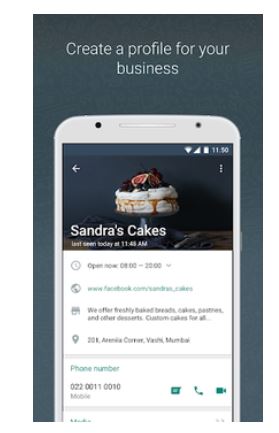
The first thing the app adds over the regular messenger is a business profile. You fill in a website, a location, contact details, and anything else a customer might otherwise have to ask about, and it sits attached to your number where anyone in a chat can tap through to it.
That sounds minor until you count how many conversations start with “where are you located?” A profile absorbs those questions before they become messages.
The other layer is messaging tools. Away messages tell someone who writes at eleven at night that you are closed and when you open, which is a better outcome than silence. It is the difference between a customer waiting and a customer assuming you have gone quiet.
A Separate Number for the Business, Not a New Phone
One detail that matters more than it seems: WhatsApp Business and WhatsApp Messenger can live on the same phone at the same time, as long as each is registered to a different number. Your personal chats stay yours, and the company number stays something a colleague can pick up.
For any owner who has ever handed their private number to a supplier and regretted it, that separation alone justifies the switch.
Running WhatsApp Business on Windows
Typing long replies on a full keyboard is faster than a phone, and support staff usually work at a desk anyway. There is no native Windows build of the business app, so an Android emulator is the usual route, and BlueStacks handles it without any special configuration. LDPlayer is the other name that comes up often for the same job.
Registration is the one step that needs thought. The app verifies a phone number by SMS or voice call, and that code has to reach you, not the virtual device, so keep the physical SIM nearby and use the call-back option if the text never lands. Before you register a number that is already active on a handset, remember the account lives on one registration at a time, and guidance on how to download WhatsApp Business for PC is worth reading first if you would rather link the desktop as an extra device than move the account off the phone entirely.
The second thing worth setting up is the shared folder between Windows and the emulator. Product photos, price lists, invoices, and PDFs mostly start life on a computer, and having a folder the emulator can see means you attach them straight from your drive instead of emailing files to yourself.
Where This Fits for a Small Team
None of this replaces a proper CRM once you are handling thousands of tickets. What it does replace is the messy middle stage, where a company is too big for one phone and too small for a support platform with seats and onboarding calls.
A desktop window with the business number open, the profile filled in, and an away message running after closing time covers most of that gap.
Which brings it back to the shop counter. The forty questions still arrive, but the ones about your address and your hours answer themselves now, and the rest get typed with ten fingers instead of one.