

Designing a room used to take weeks of planning and expensive software. You had to hire a professional or spend hours learning complex tools. Now, you can transform any space using simple online tools. By using free ai room design software, you can create professional visuals in minutes.
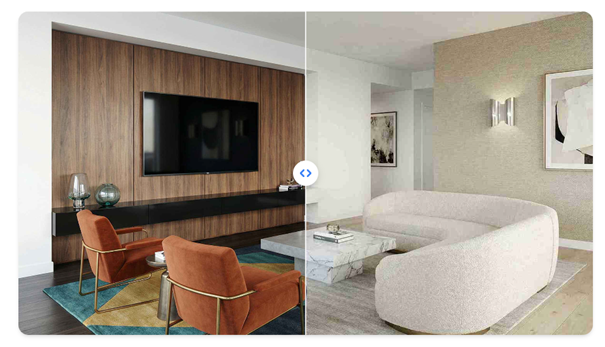
You might have a specific piece of furniture you love, but the photo has a messy background. You can use a tool to remove background free and place that item into your new design. This combination gives you total control over your creative projects. It works for homeowners, real estate agents, and even online sellers who want better photos.
- Virtual Staging for Real Estate
Virtual staging is a powerful way to show the potential of an empty house. Instead of renting expensive furniture, you can use AI to place beds, sofas, and tables into a photo of an empty room. This helps buyers imagine themselves living in the space. It makes a cold, empty room feel warm and inviting.
Key Features
The software automatically detects the walls and floor. It suggests furniture that fits the scale of the room. You can choose from different styles like modern, rustic, or industrial. The AI handles the shadows and lighting so the furniture looks like it really belongs there.
Pros
It is much cheaper than physical staging. You can change the style of a room with just one click. It helps houses sell faster by improving the online listing photos.
Cons
Some AI tools might place furniture in awkward spots. You may need to try a few times to get the perfect layout.
Best For
Real estate agents and property managers who want to dress up empty listings.
- Furniture Swapping for DIY Home Projects
If you already have a furnished room but want a change, furniture swapping is the way to go. You can take a photo of your current living room and tell the AI to replace your old brown couch with a modern blue one. This allows you to test out new looks before you spend any money at a furniture store.
Key Features
The tool can identify specific objects in your photo. You can select an item and ask the AI to swap it for something else. It keeps the rest of the room the same, so you get an accurate view of the change.
Pros
It prevents expensive mistakes in home decor. You can see how a specific color or style looks in your actual house. It is a fun way to experiment with interior design.
Cons
The AI might struggle with very complex patterns. It works best when the photo is taken in good light.
Best For
Homeowners who are planning to buy new furniture or redecorate a specific room.
- Creating Professional Product Catalogs
Online sellers often need to show their products in a realistic setting. If you sell lamps or rugs, you can take a photo of the item in your garage. Then, use a background remover to get a clean image of the product. Finally, place that product into a beautiful room generated by AI.
Key Features
You get a clean cutout of your product. The AI room generator creates a high quality environment for the item. You can match the lighting of the room to the lighting on your product for a realistic look.
Pros
You do not need a professional photo studio. It saves a lot of money on photography equipment. Your products look more expensive and professional.
Cons
It takes a little bit of practice to match the scales correctly. You need to make sure the product does not look like it is floating.
Best For
E-commerce business owners and Etsy sellers.
- Social Media Content for Interior Designers
Interior designers need to post beautiful content to attract new clients. Using AI tools allows you to create a variety of designs quickly. You can take one base room and turn it into five different styles for a carousel post. This keeps your feed fresh and shows off your range of skills.
Key Features
Fast generation of multiple design styles. Easy to export images for Instagram or Pinterest. You can add your own branding or logos to the finished designs.
Pros
It helps you stay consistent with your posting schedule. You can show clients different options very quickly. It sparks conversation and engagement on your social pages.
Cons
Followers might want to know if the designs are real or AI generated. It is important to be honest about your process.
Best For
Social media influencers and aspiring interior designers.
- Lighting and Mood Testing
The mood of a room changes depending on the light. You can use AI to see how your kitchen looks at sunset or under bright morning light. By removing the background of your windows or light fixtures, you can swap in different lighting scenarios to see what feels best.
Key Features
Adjustable time of day settings. Ability to change light temperatures from warm to cool. Realistic shadow casting based on the light source.
Pros
It helps you decide what kind of light bulbs or window treatments to buy. You can see how paint colors change under different lights. It creates a very realistic preview of the atmosphere.
Cons
Lighting is one of the hardest things for AI to get perfect. Some fine details might get lost in very dark or very bright settings.
Best For
People who are sensitive to the atmosphere and mood of their living space.
- Decluttering and Space Clearing
Before you can design a new room, you often need to clear out the mess. AI tools can help you digitally declutter a space. You can take a photo of a messy playroom and use the tool to remove all the toys and boxes. This gives you a blank canvas to start your design process.
Key Features
Object removal tools that fill in the gaps. Wall cleaning features that remove scuffs or old posters. Floor replacement to see the room with new wood or carpet.
Pros
It is much easier than cleaning the room for a photo. It helps you focus on the architecture of the space. You can see the true size of the room without the junk.
Cons
The AI might fill the space with textures that do not match perfectly. You might need to do some manual touch-ups.
Best For
People moving into a new home or those planning a major renovation.
- Personalized Digital Mood Boards
A mood board is a collection of ideas that show the direction of a project. You can use background removal to cut out fabric swatches, paint chips, and furniture photos. Then, you can arrange them inside an AI-generated room to see how they all work together.
Key Features
Layering multiple images into one scene. Easy resizing and rotating of objects. Ability to save and edit different versions of the board.
Pros
It keeps all your ideas in one place. It is a great way to communicate your vision to a contractor or partner. It is more interactive than a physical mood board.
Cons
It can be addictive to keep changing things. You might end up with too many options.
Best For
Design students and anyone who loves planning creative projects.
Comparison Summary
| Strategy | Primary Benefit | Time Required |
| Virtual Staging | Sell homes faster | 5 minutes |
| Furniture Swapping | Try new styles | 10 minutes |
| Product Catalogs | Professional photos | 15 minutes |
| Social Media | Better engagement | 5 minutes |
| Lighting Testing | Set the mood | 20 minutes |
| Decluttering | Clear the mess | 5 minutes |
| Mood Boards | Creative ideas | 15 minutes |
Final Recommendation
If you are just starting, the best way to use these tools is for decluttering and virtual staging. Start by taking a clear photo of your room. Use a background remover to get rid of any items you do not like. Then, let the AI room designer suggest a new layout. This simple workflow helps you see the potential in your home without any stress. For business owners, focusing on product catalogs will give you the most value for your time. No matter which method you choose, these free tools make professional design accessible to everyone.