


Funny content has always driven social media — but AI has given creators an enormous unfair advantage. Where producing a polished comedy clip once required filming equipment, editing software, and real comedic timing, today you can generate genuinely hilarious, shareable videos from a text description in minutes. If you know how to make funny videos with AI, you can compete with creators who have professional setups and production budgets.
This guide shows you exactly how — from the step-by-step production workflow using insMind to the specific prompt strategies that separate a forgettable clip from a million-view hit.
What Is an AI Funny Video Generator?
An AI funny video generator is a tool that creates comedy video content from text prompts, images, or a combination of both — without any filming, editing, or post-production work from the user. You describe what you want the AI to create, and it builds the video: scene composition, motion, comedic timing, and sound.
These tools have been trained on massive libraries of video content and understand the mechanics of comedy: exaggerated physical reactions, absurd scenarios, slapstick physics, and the timing principles that make something actually funny rather than just weird. Give the AI a well-crafted prompt and it will generate the visual punchline.
Modern AI funny video platforms support several creation modes:
- Text to video — describe a funny scenario from scratch and the AI builds the entire scene
- Image to video — upload a meme photo, pet picture, or selfie and animate it with comedic motion
- Video effects — apply exaggerated AI effects, face transformations, or absurd visual filters to existing footage
Why AI-Generated Comedy Videos Spread So Quickly
- Absurdity stops the scroll. AI creates scenarios that would be impossible to film — a golden retriever conducting a business meeting, a hamster piloting a spaceship. The sheer impossibility grabs attention before viewers even register what they’re watching.
- Meme culture accelerates sharing. AI-generated visuals have become their own meme format. Platforms like TikTok algorithmically reward this kind of novel, pattern-breaking content.
- Volume is a strategic advantage. You can generate ten comedy clips in the time it takes to edit one traditional video. More attempts means more chances to land on something that resonates.
- Reaction content drives reach. Funny AI videos naturally prompt duets, stitches, and reaction videos — all of which multiply your original reach without any extra effort.
- The barrier to entry is just a good prompt. You don’t need acting talent, a camera setup, or production experience. A well-constructed prompt is the entire creative requirement.
insMind’s AI funny video generator supports multiple AI models and all three creation modes — making it easy to experiment until you find the comedic approach that works for your audience. Here’s the step-by-step process.
How to Create Funny AI Videos with insMind
Step 1: Open the AI Funny Video Generator
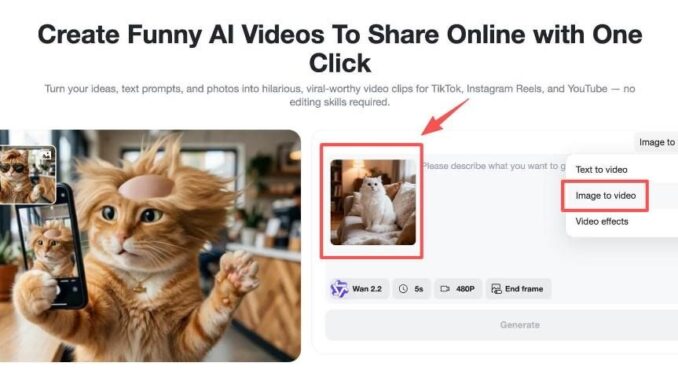
Navigate to insMind’s funny video generator. You’ll see the creation interface with options for text-to-video, image-to-video, and video effects. The tool generates content from both written descriptions and uploaded images, with built-in motion and sound generation.
Choose your starting mode based on what you have:
- Text to video — if you have a funny idea but no source image to work from
- Image to video — if you have a meme photo, pet picture, or selfie to animate
- Video effects — if you want to apply comedic transformations to existing footage

Step 2: Upload Your Image or Choose a Starting Point
For image-based comedy, upload a photo that has natural comedic potential:
- A pet doing something expressive or unusual
- A friend’s selfie (with their permission)
- Classic meme images or reaction photos
- Anything with a face and a context that can be exaggerated
Switch to Image to Video mode from the dropdown, then drag your image onto the canvas. For videos with comedic audio — sound effects, dialogue, or voiceover — select a model that supports audio generation like Kling 3.0. Include specific audio instructions in your prompt for maximum comedic impact.
Step 3: Write a Funny, Specific Prompt
This is where your comedic vision gets translated into video. The more visual and specific your description, the better the result. A strong example:
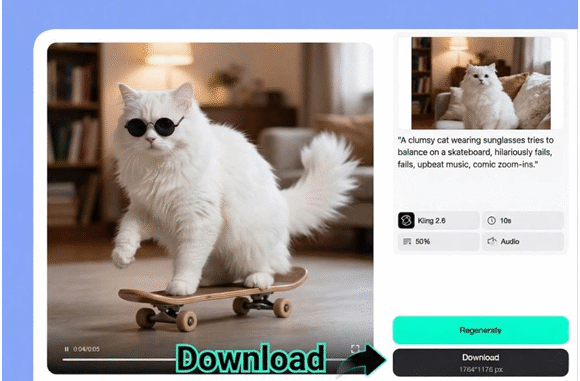
“A clumsy cat in oversized sunglasses attempts to maintain balance on a skateboard, fails spectacularly in slow motion, upbeat retro music, comic zoom-ins on the face.”
Build your prompts around these four comedic elements:
- Exaggeration — scale everything up: bigger reactions, more dramatic expressions, more extreme physical consequences
- Unexpected twist — set up one expectation visually, then subvert it
- Clear action and reaction — describe both what happens and how the subject responds emotionally
- Tone specification — “slapstick,” “absurdist,” “satirical,” or “deadpan” all produce meaningfully different outputs

Step 4: Generate and Download
Press Generate. In minutes, the AI will produce an animated scene with natural comedic motion, timing, and — if your model supports it — matching audio. Preview the result: if it lands, download in high definition. If it needs adjustment, modify the prompt, try a different model, or regenerate for a fresh take. Multiple variations can be produced in minutes.
Proven Prompt Formulas for Viral Funny AI Videos
Animal Comedy — Evergreen and Consistently Viral
Animals performing human activities is one of the most reliable comedy formats in existence. AI makes the scenarios even more absurd than anything you could film:
- “A golden retriever in a tailored suit delivering a TED Talk about belly rubs, passionate hand gestures, professional conference lighting”
- “Two cats engaged in a heated dispute at a restaurant; one flips the table dramatically in slow motion”
- “A hamster operating excavation machinery at a construction site, epic film score, cinematic angles”
Everyday Absurdity — Relatable with the Volume Turned Up
- “A person slips on a banana peel in ultra slow motion while opera music swells; the banana peel winks at the camera during the replay”
- “A toaster launches bread into orbit; NASA mission control watches in stunned silence; breaking news chyrons”
- “Monday morning office meeting where everyone is secretly a superhero in civilian disguise, straight-faced delivery”
Meme Recreation — Turn Static Formats Into Animated Content
Take existing meme formats and add motion for additional engagement. Upload a meme image and apply these animations:
- Distracted boyfriend meme: all three characters storm off in different dramatic directions
- “This is fine” dog: increasingly chaotic background events accelerate while the expression never changes
- Any reaction-face meme: add full-body movement and escalating physical expressions
Pop Culture Parodies — Reference the Known, Subvert It
- “A chihuahua reenacting the Titanic bow scene, dramatic violins, paws extended, miniature ocean waves”
- “A jury of vegetables deliberating a courtroom trial; the defendant broccoli delivers an emotional closing argument”
How to Maximize the Reach of Your Funny AI Videos
- Open with the most absurd frame. Viewers decide within one second whether to keep watching. Lead with the punchline, not the setup.
- Keep it under 15 seconds. Short enough to watch on repeat, long enough to land the joke. High completion rates are what the algorithm rewards.
- Layer in trending audio. TikTok’s algorithm surfaces content using popular sounds. Match your video to a trending track for an automatic visibility boost.
- Post at audience peak hours. For most creators, 7–9 AM and 7–11 PM in the target timezone consistently outperform other windows. Track your own analytics to refine this.
- Stack broad and niche hashtags. Mix wide-reach tags (#funny #AI #meme) with community-specific ones (#AIcomedy #funnyAI). This hits large audiences and engaged niches simultaneously.
- Batch produce content. Use the AI video generator to create 5–10 variations of a concept. Post the strongest one today and schedule the rest across the coming week.
- Reply to comments with new AI videos. Comment-section engagement signals are heavily weighted by every major platform’s algorithm.
Don’t overlook AI funny face filters — layering absurd visual effects on top of AI-generated video adds another dimension of comedy that feels genuinely fresh.
Frequently Asked Questions
Is there a free AI funny video generator available?
Yes. insMind offers free credits for new users, providing access to multiple AI models and both text-to-video and image-to-video creation modes at no cost. Additional credits are available through affordable subscription plans for higher-volume production.
What makes a strong prompt for funny AI videos?
The best comedy prompts are visually specific, contain clear exaggeration, and include an unexpected element. Structure your prompt around a subject, the action, the comedic style, and any audio or mood details. Example: “A penguin in a power suit walks confidently into a corporate job interview, adjusts reading glasses, opens a briefcase containing only fish.”
Can I use my own photos to generate funny AI videos?
Yes. Image-to-video mode accepts any photograph — pet photos, selfies, meme images, product shots — and animates it based on your prompt. This mode is particularly strong for creating personalized comedy content that feels unique and shareable.
Which AI model works best for comedy content?
For image-to-video with audio support, Kling 3.0 is the top choice — ideal for dialogue-based comedy and sound-driven humor. For fast text-to-video generation, Wan 2.2 delivers quick results that work well for absurdist scenarios. insMind lets you switch between models to find the best fit for your specific comedic style.
How long does it take to generate a funny AI video?
Most videos generate within 1–3 minutes depending on the model and clip length. A standard 5-second comedy clip is often ready in under a minute. Multiple variations can be produced quickly enough to compare and choose the funniest version before posting.
Start Creating Your First Viral Funny Video Now
AI has genuinely democratized comedy video creation. You don’t need a camera crew, a script supervisor, or even natural comedic timing — the AI handles pacing and execution. What you need is a funny idea and the willingness to experiment.
Whether you’re building a TikTok following, producing content for a brand, or simply trying to make your group chat laugh, insMind’s AI video generator gives you everything you need to create shareable comedy clips in minutes. Start with one prompt and see where it takes you.