
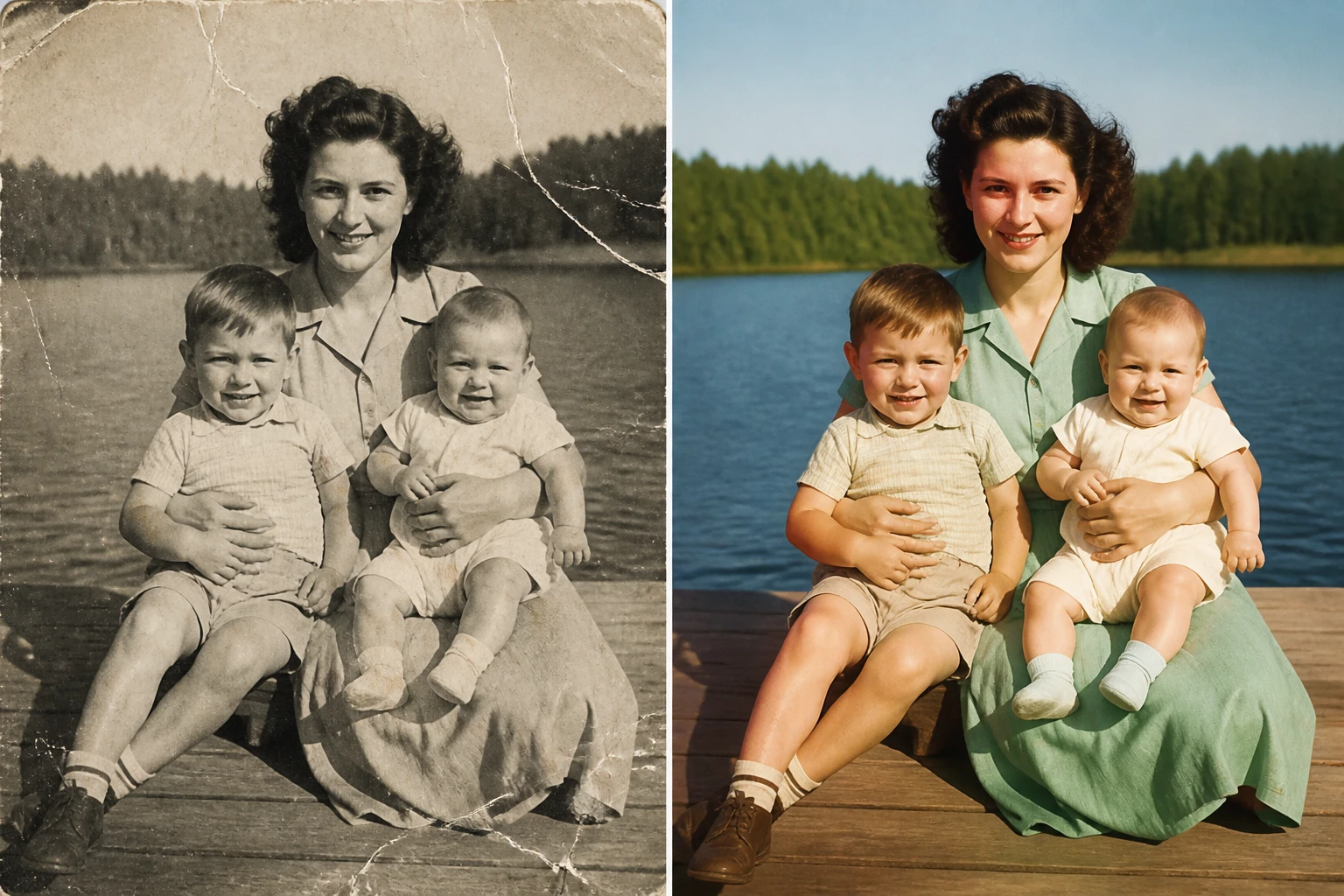
Photos capture moments that we never want to forget. Sometimes those photos do not look as good as we remember. They might be blurry, faded, or taken in bad lighting. You do not need to be a professional editor to fix these problems anymore. Modern software uses smart technology to clean up images and make them look like they were taken in a professional setting.
If you have a box of old family pictures that have seen better days, you can use AI Photo Restoration to bring them back to life. This technology looks at the damaged parts of a picture and figures out what should be there. It can fix cracks, remove stains, and even add color to black and white shots. You can save your family history without spending hours learning how to use complicated design software.
For people who need a professional look for their work profiles, an AI Photo Studio can change a simple selfie into a high quality portrait. You do not have to book an expensive photographer or find a studio with the right lights. The software handles the background and the lighting for you. It makes sure you look your best by adjusting the shadows and making the colors pop.
Real World Scenarios for AI Image Tools
There are many ways these tools help people every day. Here are three common situations where smart image editing makes a huge difference.
Saving Faded Family Archives
Most families have a collection of old prints that are starting to fall apart. These photos often have physical damage like creases or water spots. The colors might have turned yellow or faded away completely. When you scan these photos, they still look old and damaged.
Smart restoration tools analyze the patterns in the image. They can identify where a scratch has ruined a face and rebuild that area using surrounding pixels. This process happens in seconds. Instead of losing a picture of your grandparents, you get a clean version that looks like it was printed yesterday. This helps keep memories alive for the next generation.
Building a Professional Personal Brand
If you are looking for a job or starting a business, you need a good photo of yourself. Not everyone has the time or money to go to a photo shoot. You might take a photo in your living room, but the background looks messy or the lighting is too dark.
A virtual studio tool can take that basic photo and transform it. It can remove the cluttered background and replace it with a clean, professional office or a solid color. It also adjusts the light on your face so it looks like you were standing in front of professional lamps. This gives you a polished look for your LinkedIn profile or your company website.
Improving Online Sales for Small Businesses
Small business owners often take their own product photos. If you are selling handmade jewelry or vintage clothes, your photos need to look great to attract buyers. Taking photos with a phone can lead to shadows or grainy images that do not show the details of the product.
Using enhancement tools allows you to sharpen the edges of your products. You can brighten the image so the colors look accurate. A clean photo builds trust with customers. When they can see the details clearly, they are more likely to buy from you. This helps small shops compete with bigger brands that have large marketing budgets.
Benefits per Scenario
Each of these situations shows how technology solves specific problems. Here is a breakdown of the benefits for each user.
|
Family Historians |
Professionals |
Small Business Owners |
| Preserves physical history | Saves money on photographers | Increases customer trust |
| Fixes physical damage | Provides a clean background | Shows product details clearly |
| Adds color to old memories | Improves lighting on faces | Makes listings look professional |
| Easy to share digitally | Quick turnaround for profiles | Helps sell items faster |
For the family historian, the main benefit is emotional. You are not just fixing a file, you are saving a memory. The software does the hard work of identifying textures and colors that have been lost to time.
For the professional, the benefit is efficiency. You can get a new headshot whenever you need one. If you change your hair or get new glasses, you can just take a new photo at home and run it through the studio tool. You always have an up to date image that looks excellent.
For the business owner, the benefit is financial. Better photos lead to more sales. You do not need to buy expensive cameras or light boxes. You can use the tools you already have and let the software handle the quality control.
Practical Workflow for Better Images
Using these tools is simple if you follow a few basic steps. You do not need to be a tech expert to get great results.
Step 1: Choose your original image. For restoration, try to get the highest quality scan possible. If you are taking a new photo for a studio tool, stand in front of a plain wall if you can, but do not worry too much about the background.
Step 2: Upload the file to the tool. Most modern platforms allow you to drag and drop your file directly into the browser.
Step 3: Select the specific fix you need. If the photo is old, choose the restoration option. If you want to change the setting, choose the studio or background option.
Step 4: Review the changes. The software will show you a preview of the new image. You can often see a before and after comparison to see how much the photo has improved.
Step 5: Download and save. Once you are happy with the look, save the file to your computer or phone. It is a good idea to keep the original file and the new version in separate folders.
|
Feature |
What It Does |
Why It Matters |
| Noise Reduction | Removes graininess | Makes photos look sharp and clear |
| Color Grading | Adjusts tones and hues | Makes the mood of the photo right |
| Object Removal | Deletes unwanted items | Keeps the focus on the subject |
| Upscaling | Increases resolution | Allows for larger prints without blur |
Common Mistakes to Avoid
While these tools are very powerful, you should keep a few things in mind to get the best results.
Do not over edit your photos. Sometimes people want to remove every single wrinkle or shadow, but this can make a person look like a robot. You want to keep some natural details so the photo still looks real.
Avoid using very low resolution images as a starting point. While AI can add detail, it works best when it has a good foundation. If a photo is extremely tiny and blurry, the software might have to guess too much, which can lead to strange looking results.
Make sure you check the lighting in your original shot. Even though studio tools can fix a lot, having a bit of natural light on your face will always produce a better final product. Turn toward a window when you take your selfie for the best outcome.
Conclusion
Technology has changed the way we handle our digital memories and professional images. You no longer need to spend years learning how to edit photos by hand. Whether you are fixing a torn picture of your great grandmother or creating a new headshot for your career, these tools make the process fast and easy.
By using smart restoration and studio features, you can ensure your photos always look their best. These tools save time, reduce costs, and help you present the best version of yourself or your history to the world. Start looking through your old folders and see which photos could use a quick upgrade. You might be surprised at how much detail is hidden in those old or dark images.